All projects under one roof
The daemon binds once (a single local port) and routes each request to the right project by header. Member repos carry no daemon code and open no ports of their own — add the tenth project and nothing new spins up.
Multiple projects. Multiple AI agents per project. Desktop & mobile.
Every repo under one control plane. A standing team of agents that runs your roadmap — for days — while you watch each move in real time. Free.
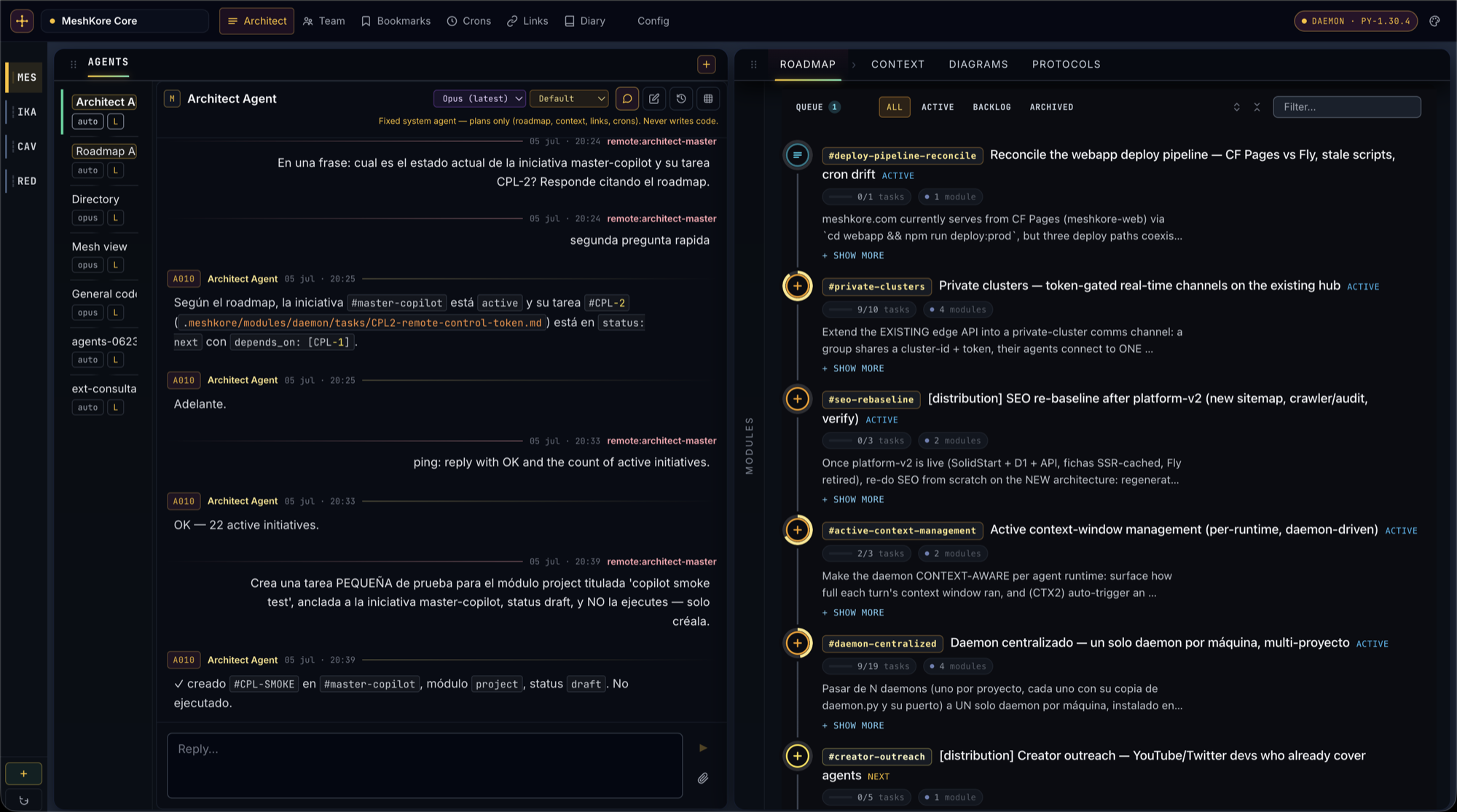
A graphical, real-time view over every project and every agent. No CLI, no SSH.
A single daemon runs on your machine and serves all of your repos at once. The Architect lists every project in one rail, over one connection — click to switch, no relaunch, no per-repo setup, no juggling terminals. Stop context-switching between a dozen checkouts and SSH sessions; your whole workspace is one screen.
The daemon binds once (a single local port) and routes each request to the right project by header. Member repos carry no daemon code and open no ports of their own — add the tenth project and nothing new spins up.
Hit Add a project, paste the one-line prompt into your agent, and the daemon self-scaffolds the .meshkore/ tree on first boot. The repo shows up in the rail seconds later — nothing to configure by hand.
One socket, header-routed. Click a project in the rail and the roadmap, agents and chat swap instantly — the same live picture for every repo, no reconnect. Ports stay stable across restarts, so a project always comes back where you left it.
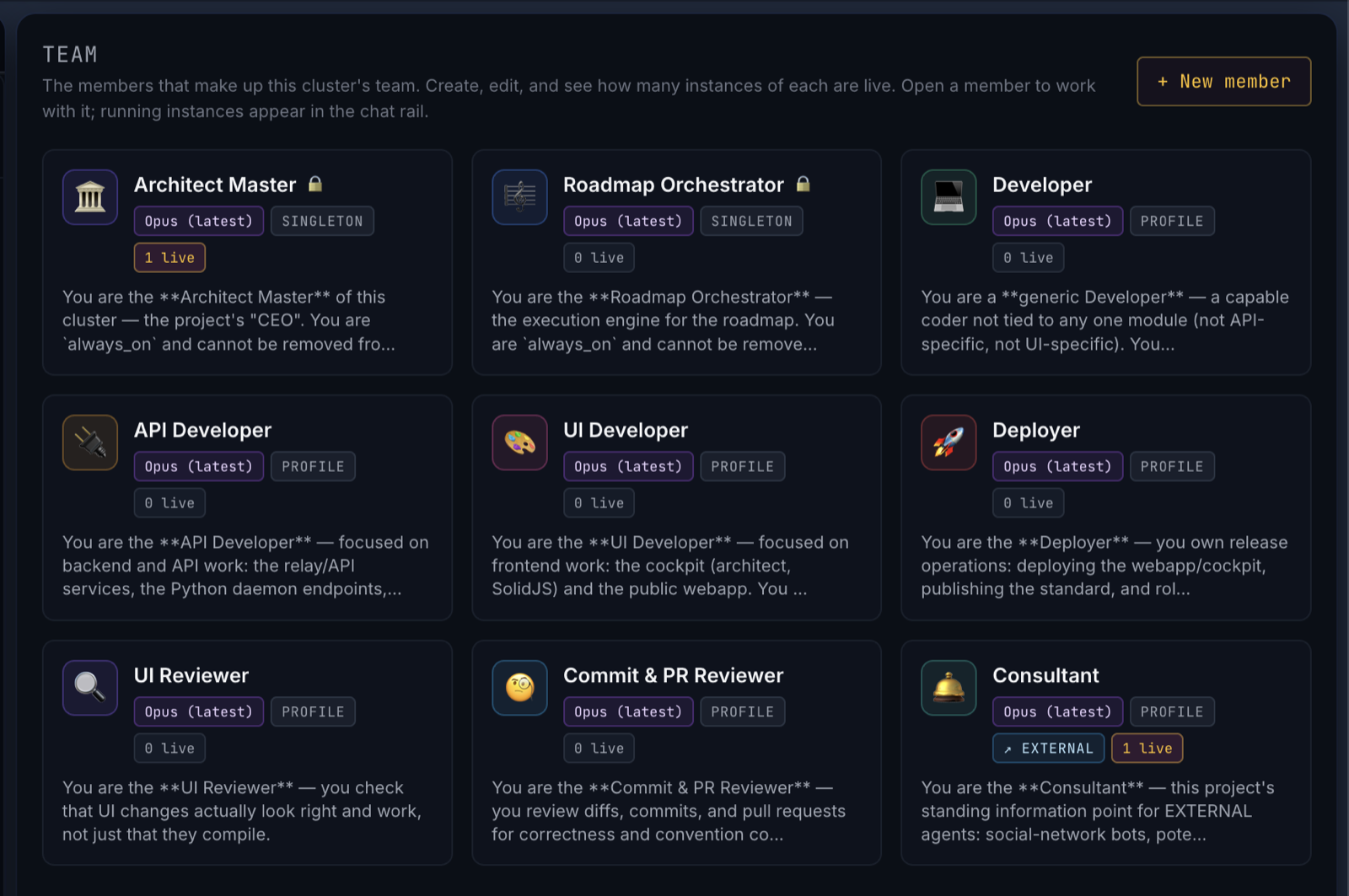
Every project is born with a full roster of specialist agents. Each member is a reusable profile — its mission, its baseline model, its brief; spin up as many live instances of it as you need. Members default to the strongest model available, so they get smarter as the models do — dial each one down when you want to save budget.
Holds the whole picture and owns the roadmap — it creates and maintains initiatives and tasks, sets priorities and dependencies, and keeps the live plan honest against what the code actually is. You talk to it in plain language; it turns your intent into a well-ordered plan.
The execution engine. Press Run all and it walks the queue in roadmap order, dispatching the right specialist for each task and coordinating their parallelism — verifying every unit landed cleanly before advancing to the next. It runs the plan; it doesn't rewrite it.
…backed by the specialists it hands work to — developer, API, UI, deployer, reviewers and a consultant other agents can ask about your project. Add, rename and tune your own any time.
The Team zone — every member, its model and how many instances are live, in one place.
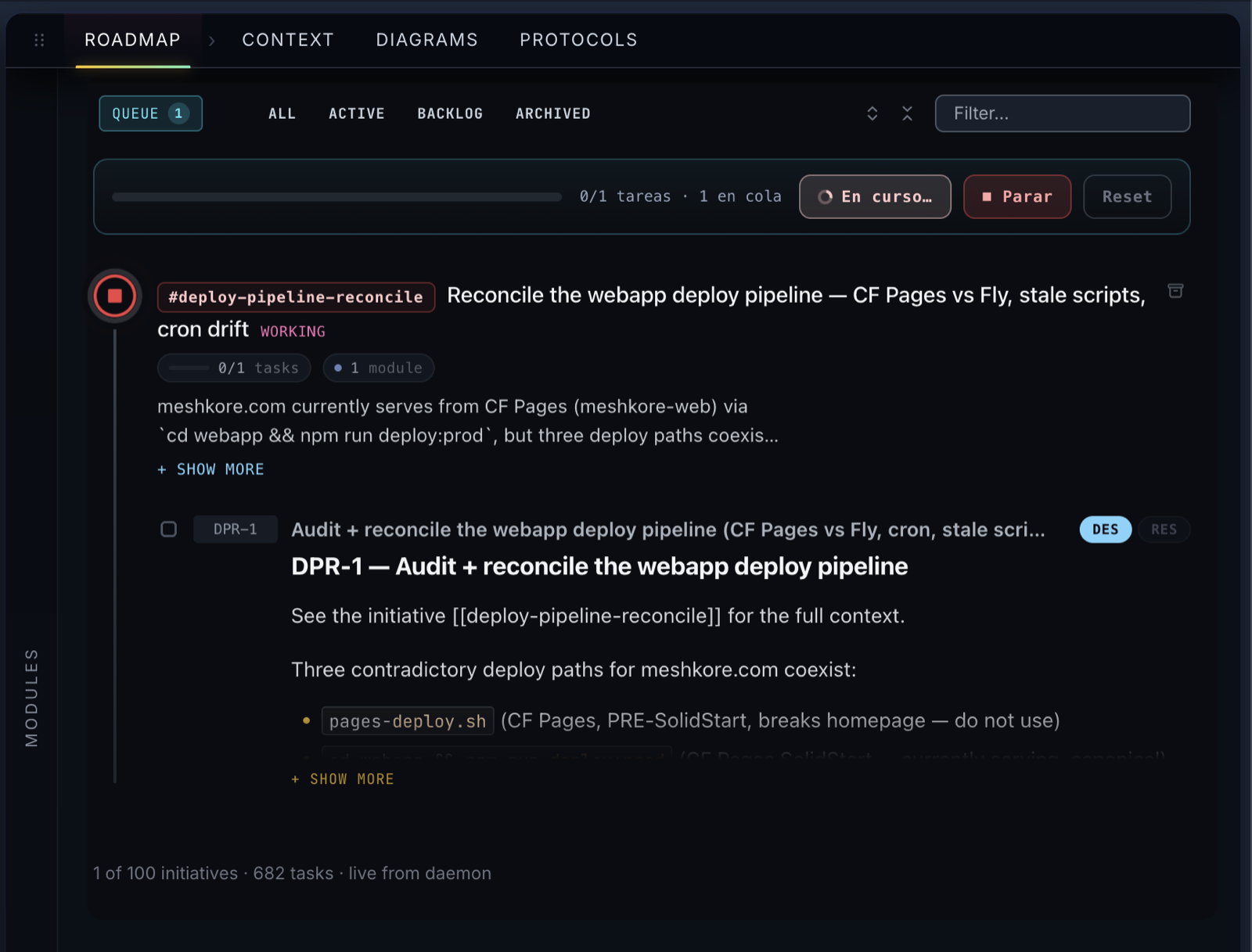
The Architect turns a planned roadmap into an execution engine. Press Run all on the top-right of the roadmap view and the Roadmap Orchestrator takes over — it reads the cluster's initiatives, plans the order (parallel where modules don't collide, sequential where they do), and dispatches the right specialist for each task: coding, deploy, db, testing, docs, review. It narrates every move in its own chat, verifies each unit landed, and keeps going — unattended, task after task — until the plan is done or it needs you. You watch a project execute itself.
The roadmap follows a three-piece model — Initiative (a coherent work-stream), Task (≈ one week of work), and an optional Cycle (a 1–2 week timebox that cuts across initiatives). It's the Linear primitive set, mapped onto plain markdown files under .meshkore/. Cycles are opt-in: skip them and the Architect behaves exactly as before.
The Orchestrator is not a dumb job queue — it's an agent with the full project context and the daemon's HTTP API at its fingertips. It reads .meshkore/roadmap/, decides what runs in parallel, and dispatches each worker itself.
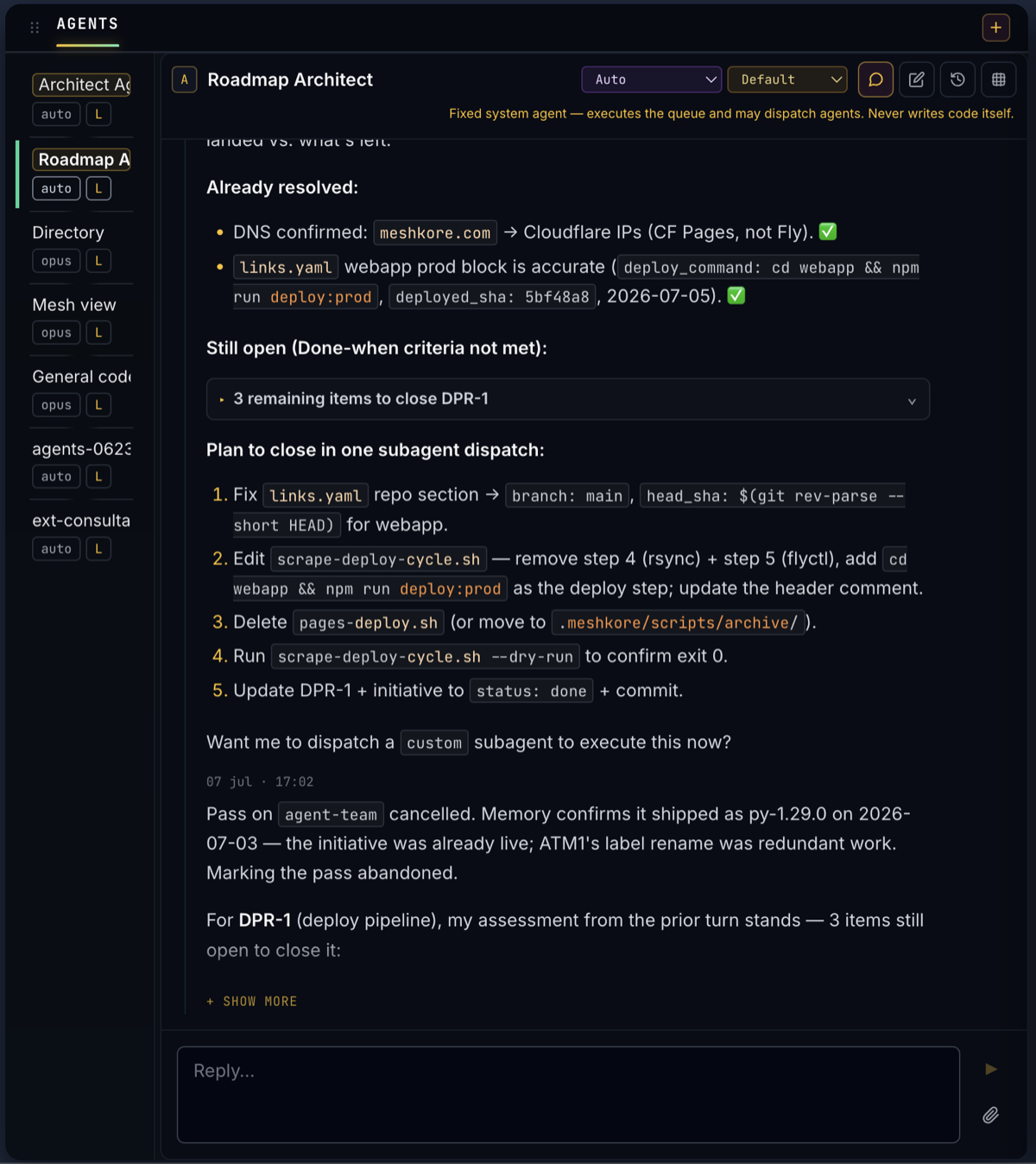
"Started task DEMO3 on A007 (general coder). Started OPS1 on A008 (deploy) in parallel. A007 done — DEMO3 ✓. Moving to next initiative." The chat fills with that. When it hits a blocker it stops and asks you for a single specific input, then resumes.
Every sub-agent the architect launches is a daemon-side ChatSession with its run record persisted to .meshkore/.runtime/runs.json. The Architect hydrates from /health.chat_active_convs on attach, so a refresh — even mid tool-call — never lies about who is working on what.
When a worker finishes, the daemon wakes the Orchestrator with the result — commit landed, checks green, blocked, or rate-limited — and it dispatches the next slot. No polling, no cron you maintain. The loop runs itself for as long as there's work in the queue.
The daemon enforces the guard-rails, not just the prompt: one initiative in flight at a time, a wave cap on parallel workers, depends_on gating so nothing starts before its upstream is done, and a verify-before-done check on every task. Two agents can't stomp the same work.
Kick off a roadmap pass on a timer from the Crons zone, and if an agent hits a provider rate limit the pass auto-pauses with an ETA and resumes on its own — instead of dying halfway. Come back the next morning to a wall of shipped tasks.
The Architect isn't just a launcher — it's a cockpit. Every agent's chat and tool calls stream live; the whole project's activity is one screen away; and when an agent says it's done, you can make it prove it.


Follow each agent turn — every file it reads, edits and commits — as it happens.
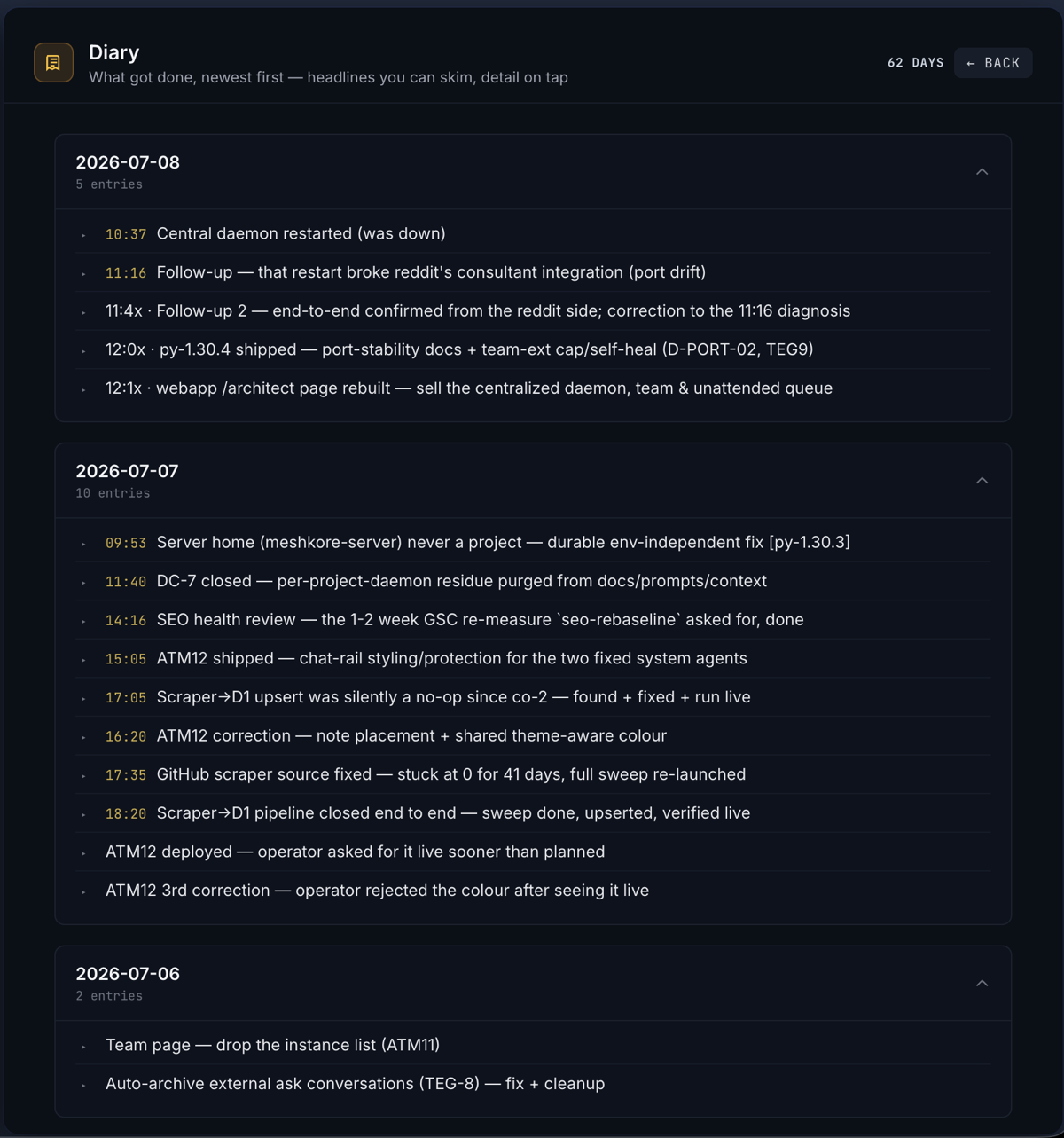
A chronological activity blog of everything that happened, day by day.
Drive a real browser to screenshot and functionally check a change — a mechanical verdict, not a vibe.
Schedule recurring jobs and roadmap passes on a timer.
Your deploy registry and cluster settings — including single-file credentials — in one place.
Browse the project's context tree and its reusable runbooks — the same docs your agents read.
MeshKore is a convention, not a lock-in. Pick the CLI each team member runs on — Claude Code, Codex or Gemini — right in the Architect. And any other agent that reads a URL and edits files stays first-class: the daemon renders a native instructions file for it, so your repo speaks its language out of the box.
Set the driver per member from the Team zone — mix Claude Code, Codex and Gemini across the same roadmap. Claude Code is the default and most battle-tested for long unattended passes; Codex and Gemini shipped in py-1.31.
No commands, no scripts. The Architect walks you through the whole setup in under two minutes.
The Architect detects whether the Architect is installed in your repo. If not, it shows the exact snippet you need to paste in your AI agent (Claude Code, Cursor, GitHub Copilot, Codex, …). Your agent reads the URL, adds the .meshkore/ standard to the repo, starts the local daemon — and the Architect lights up. Done.
If you have Claude Code, Cursor, GitHub Copilot, Codex or Cline open in your repo, skip the Architect — paste the install prompt and let the agent do the whole thing. (Click to show the snippet.)
Implement the MeshKore Architect in this repo. Read https://meshkore.com/standard and follow it end-to-end: adopt the standard, start the daemon, confirm the Architect is reachable.
The agent reads the URL, applies the standard, starts the local daemon, and tells you when you can open architect.meshkore.com. You don't touch a thing — this is exactly the snippet the Architect would have given you in step 1.
The stuff people ask before they hit install. If yours isn't here, open an issue at github.com/meshkore.
Yes — fully. No invites, no waitlist, no paid tiers, no payment info. You bring your own agent (e.g. Claude Code); MeshKore itself is free.
That's the whole point. One daemon on your machine serves every repo you add, and the Architect lists them all in one rail — click to switch between projects instantly, no relaunch. Add a new one any time from Add a project.
Yes. Press Run all and the Roadmap Orchestrator dispatches task after task — verifying each one landed before moving on — with no polling on your part. It pauses and resumes around provider rate limits, and stops to ask only when it hits a genuine blocker. You can also schedule passes from the Crons zone.
No. The daemon can drive Claude Code, Codex or Gemini — chosen per team member — and any other agent that reads a URL and edits files (Cursor, Cline, Aider, Copilot) works too, via the native instructions file the daemon renders. Claude Code is the default and most battle-tested for long unattended passes.
It reads the MeshKore standard — a tiny .meshkore/ folder convention for organising projects and orchestrating agents — applies it to your repo and starts the local daemon that the Architect connects to. ~5 minutes, fully autonomous.
Yes. It's local-first: the Architect reads your local filesystem and the daemon never pulls from GitHub. Your code stays on your machine.
Not yet — and you don't need one. What ships today is the local centralized daemon: one process per machine serving all your projects, driven from architect.meshkore.com in your browser while your code never leaves your machine. A hosted, multi-tenant Cluster Cloud is on the roadmap; it isn't available yet.
Yes. The daemon self-updates from a signed release channel (Ed25519-verified), so once installed it keeps itself current with no action from you. Today's build is py-1.31.2 on Standard v30.
architect.meshkore.com talk to my local daemon?Via a public DNS trick: daemon.meshkore.com is a Cloudflare A record that resolves to 127.0.0.1 — your own loopback. The daemon serves HTTPS+WSS on its ports (5570-5589) with a Let's Encrypt wildcard cert for *.daemon.meshkore.com. The Architect at architect.meshkore.com connects to https://daemon.meshkore.com:<port> — same as if it were talking to a public server, except it never leaves your machine. No mixed-content blocks, no Chrome Local Network Access prompts. Same pattern Plex uses with *.plex.direct.
Tell your AI agent the setup URL. Open the Architect. Done.
Local-first · Standard v30 · signed auto-update · free